A Discord summary bot · free to try
Catch up on
what you missed.
Your favorite channel moved on while you were away. Run /catchup for a short, private summary from your last message, with links back to the conversation. Reshape it, ask a cited follow-up, or schedule the next recap.
2,000 free credits, once per server. No card or API key.
Add the bot, open a channel, and run /catchup.
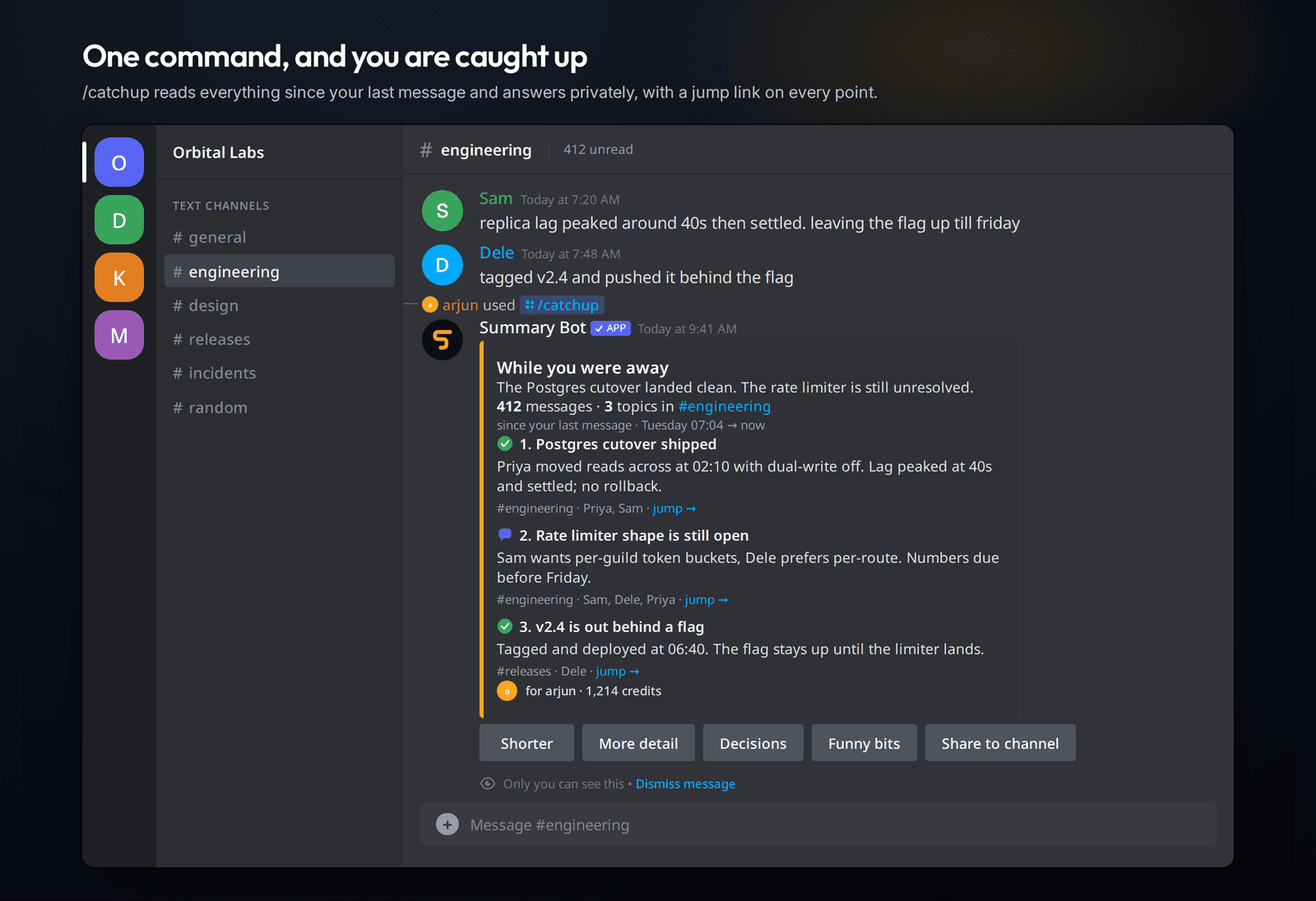
While you were away
The Postgres cutover landed clean. The rate limiter is still unresolved.
412 messages · 3 topics in #engineering
since your last message · Tuesday 07:04 → now
#engineering · Priya, Sam · jump →
#engineering · Sam, Dele, Priya · jump →
#releases · Dele · jump →
Only you can see this
A real /catchup response. The conversation in it is made up.
Nothing to set up
Add it, run /catchup, read the summary. No API key, no config command, no dashboard to fill in.
Only what you can read
Every request checks your own Discord permissions before the bot’s. It can never show you a channel you can’t already open.
Your messages aren't stored
Message content is held in memory for one request and then discarded. No transcripts, no archive, nothing to leak later.
See it work
Not a promise. The actual product.
A catch-up, a recast, a cited answer, and an automatic recap — reconstructed from the real messages Summary Bot sends inside Discord.
/catchup
Turn the unread pile into three things worth knowing.
It starts at your last message, answers privately, and puts a jump link on every point so the original conversation is always one click away.
Live
Running in 807 servers,
right now.
Read straight out of production every fifteen minutes. Nothing here is a target, a projection, or a number somebody typed into a slide.
807
Discord servers
637K
Members in those servers
99.98%
Uptime · last 30 days
45 ms
Discord gateway latency
Availability, day by day
last 30 days
Beyond catch-up
It knows when to keep going.
The simple command stays simple. These are there when a server needs more than a one-off recap.
@Summary Bot
Give it a job, not just a command.
Mention the bot and it opens a visible working thread. It reads, searches, opens links you paste, and works to one credit limit you can watch. If it runs short it still answers with what it found — and anything that would post, edit, or delete waits for you to confirm.
/live
Keep one busy channel current.
One posted summary updates in place after enough new messages arrive. It counts at the gateway instead of polling, so a quiet channel does no work and spends nothing.
Welcome summaries
Help new members find their footing.
Pro and Scale servers can send a useful orientation DM after screening, drawn only from channels that the new member can already read. Admin-enabled, and every member can opt out. Set up welcome summaries.
Permissions
Private by default. Permission-safe by design.
The bot is useful because it can read Discord. Its boundaries matter just as much as its summaries.
Your access is the boundary
Discord’s channel picker filters what you see, but a hand-made request can name any channel. So every read re-checks the person asking before it checks the bot. Ask about a channel you can’t open and you get a refusal, not a summary.
A public recap reads for its audience
When a summary is posted where everyone can see it, a source channel is only included if everyone who can see the destination can also read that source. A moderator channel can’t end up quoted in #general.
Members keep control of their own words
Anyone can exclude their own messages from every summary, turn off welcome DMs, or delete everything the bot holds about them. An admin can put a channel off limits to everyone — including themselves.
Shared credits have member safeguards
Daily and billing-period limits stop one person from silently emptying a server’s balance. /admin overview shows the whole setup; /admin limits changes those safeguards without turning credits into per-person billing.
What it costs
One meter, and you can do the maths yourself.
Credits are the only unit anywhere in the product. One credit is 35 characters of raw message content, rounded up per message. A message of up to 35 characters is one content credit; longer messages contribute more.
A summary costs the content credits it read, times the quality tier you picked — and never fewer than that tier’s minimum.
- Every action tells you
- what it spent, and what’s left
- Anything over 3,000 credits
- asks you first
- Top-up credits
- never expire
- Unused monthly credits
- reset each billing period
/usagetells you where you stand, instantly.
Plan, shared balance, your safeguards, recent activity, and the exact renewal rule — in one private reply, free, and open to everyone in the server. No dashboard, no login, no waiting for a monthly email to find out you ran out.
Plans
Start free. Upgrade only when the free credits run out.
Bigger plans buy longer reads, better models, and recurring summaries. Nothing is hidden behind a sales call.
Starter
$5/mo
A small server with one or two channels worth keeping up with.
- 50,000 credits a month
- Up to 2,000 messages per summary
- /ask and @mention using shared credits
- 1 daily or weekly schedule
Pro
$15/mo
An active community that wants recaps to arrive on their own.
- 175,000 credits a month
- Server-wide catch-ups and Balanced quality
- 5 schedules, 1 live channel
- Presets, custom prompts, welcome summaries
Scale
$38/mo
A large server where several channels move every day.
- 500,000 credits a month
- Up to 5,000 messages, Deep quality
- 25 schedules, 5 live channels
- Everything in Pro
Every server starts with 2,000 free credits — enough to run a few real catch-ups before you decide anything. Subscriptions are bought inside Discord and cancelled there too.
You don’t have to guess which one.
/recommend measures how busy your server really is and says which plan fits, what a cheaper one would cost you, and when you’d run out — free, and without reading a single message.
Stuck, curious, or think something’s wrong?
The community server is where I actually answer. It’s one person running this, so you’ll get a real reply rather than a ticket number — bug reports, billing questions, and feature ideas all welcome.
The conversation kept going.
You can still catch up.
Add Summary Bot to a server and run /catchup. If it isn’t useful in the first minute, remove it — that’s the whole pitch.